Gift Card Delivery Methods
All gift cards purchased through Wishlist Gift Cards are delivered electronically, with a few exceptions. Most orders are processed within a few minutes, but during periods of high demand or occasional server delays, delivery may take a little longer than expected. We do not offer Physical Gift card.
Once your order has been processed, we’ll send you an email containing your gift card details, including activation instructions and links to redeem or use your gift card. If you can’t find the email, be sure to check your Spam, Junk, or Promotions folders, as it may have landed there. If you used a work email address when placing your order, your company’s email filters may also block or redirect the message.
Fixing an incorrect email entered at checkout
If you entered the wrong email address during checkout, please contact us at wishlist@thrivepass.com so we can resend the email to the email of your choice. Just a heads-up, we may not be able to retrieve or modify gift card emails that have already been sent. In cases where you don’t see your gift card or believe you entered the wrong email address during checkout, checking your account’s order history is the quickest way to access your gift card. Simply go to the “My Orders” section to view and redeem it.
How to view a Gift Card?
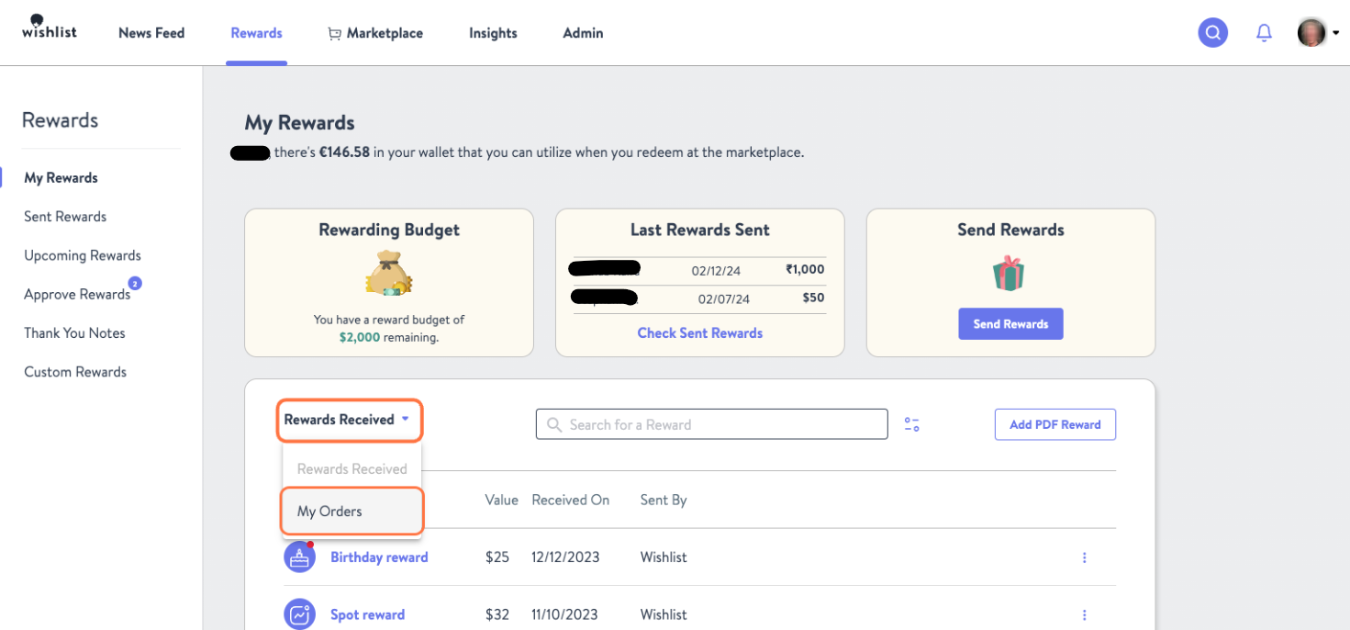
If you're using the Wallet, once your gift card is processed, you can view it in the My Orders section:
- Go to Rewards tab > My Rewards > Rewards Received
- Click My Orders
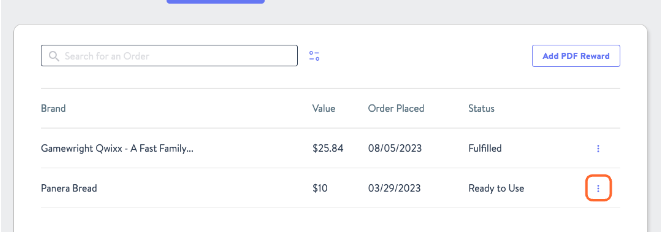
- Click the Kebab Menu (three dots) next to “Ready to Use”
- Select Order Details
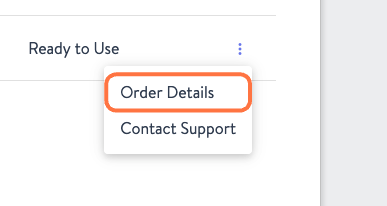
- From here, you can activate your card or resend it to your email

Trouble Redeeming a Gift Card?
If you're having trouble redeeming a gift card at the merchant, we recommend reaching out to the gift card provider's customer support team directly - they have the right tools to assist you. You can find their contact information (phone, email, or chat) on their website. If you've already activated your gift card, their contact information is also available on the page showing your gift card number and PIN.
Can't View Your Gift Card?
If you're unable to view the gift card in your Wishlist account, please feel free to reach out to us. You can click the Contact Support button in your Wishlist account or email us directly at wishlist@thrivepass.com.
Was this article helpful?
That’s Great!
Thank you for your feedback
Sorry! We couldn't be helpful
Thank you for your feedback
Feedback sent
We appreciate your effort and will try to fix the article