You may receive periodic email notifications from ThrivePass to keep you informed and engaged with your account. These notifications fall into three categories:
- Deposit Notifications – Alerts when funds have been added to your ThrivePass account.
- Balance Reminders – Reminders when you have unused funds available.
- Survey Emails – Requests for feedback about your experience with ThrivePass.
Managing Your Email Notifications
You can customize or disable these notifications at any time by adjusting your settings:
- Log in to your ThrivePass account.
- Select the Settings tab.
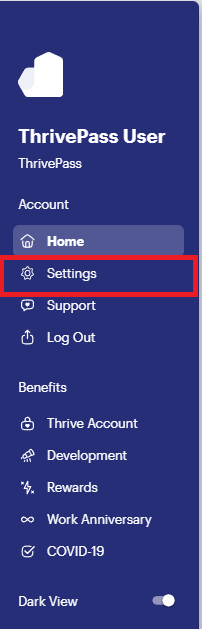
- Navigate to the Notifications section.
- Toggle the notifications on or off based on your preferences.

If you have any questions about email notifications, please contact our Support Team here and we would be happy to help assist you!
Was this article helpful?
That’s Great!
Thank you for your feedback
Sorry! We couldn't be helpful
Thank you for your feedback
Feedback sent
We appreciate your effort and will try to fix the article